The Preparation of a VFR Flight
Flying is not as simple as driving a car. Indeed, the pilot must carefully prepare for the flight to guarantee their safety and the safety of their passengers. Let’s explore the key steps involved in successful preparation!
Before we begin, I’ll explain some technical terms that I will be using:
- CTR (Control Traffic Region): A zone designed to protect flights taking off or landing at an airport.
- TMA (Terminal Manoeuvring Area): A zone above the CTRs, also designed to protect flights approaching or departing an airport.
- Zones “P, R, D”: Areas where access is respectively prohibited, regulated, or dangerous.
- NOTAM (Notice to Airmen): A message intended to inform pilots about changes to infrastructure, aerial hazards, and temporary restricted zones.
- SUP AIP (Supplement to Aeronautical Information Publication): A supplement that provides additional information related to the NOTAM.
- VAC Chart (Visual Approach Chart): A chart depicting an airport along with departure and arrival routes, taxiways, and in larger airports, a map of aircraft parking areas!
- METAR (Meteorological Aerodrome Report): An aviation weather observation report.
- TAF (Terminal Aerodrome Forecast): A weather forecast valid for 6 to 30 hours for an aerodrome.
- VFR (Visual Flight Rules): A flight conducted under visual conditions and its associated regulations.
Study of Aeronautical Documentation
This involves reviewing NOTAMs and SUP AIP documents to verify the feasibility of the flight (e.g., checking if the airport is closed for maintenance or if an air zone is reserved for a glider competition). We also examine VAC charts to define departure and arrival points, and on the ICAO chart, we identify the airspace to be encountered or avoided.
Defining the Route
We draw a line from the airport to the desired departure point and then navigate around restricted zones and major cities to reach our destination. We also select reference points along this route to help us orient ourselves once in flight.
Creating the Navigation Log
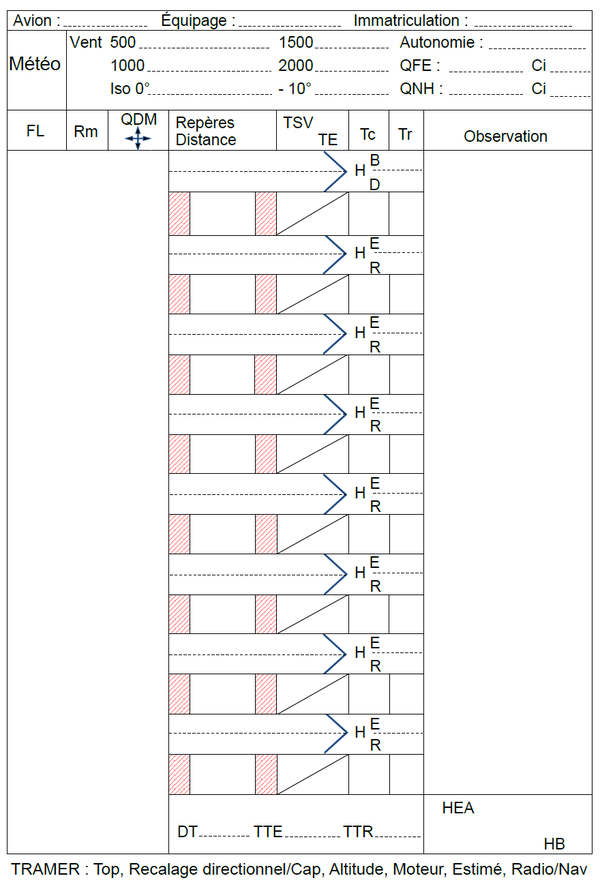
The navigation log is an essential tool, grouping headings, distances, and times between reference points. We also add radio navigation radials and frequencies. A color code is used to differentiate information:
- Black: Reference points, distance, and time.
- Red: Radio frequencies and VOR radials.
- Blue: ADF radials.
- Green: Altitude in feet.
Fuel Calculation and Weight & Balance
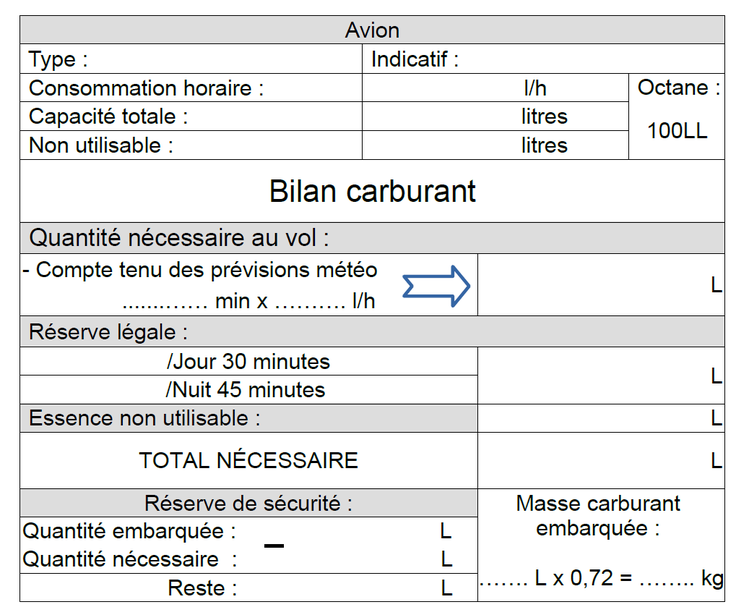
Now that we know the overall flight time, we can move on the fuel calculation. This determines whether we have enough fuel for the trip or if refueling is necessary. We must also account for a mandatory 30-minute reserve (45 minutes for night flights), taxiing from the parking area to the runway, wind effects (headwind or tailwind), approach, and landing. During the flight, the pilot will update the fuel consumption, which must match the fuel balance.
Aircraft have maximum weight and center of gravity limits. You can find these values in the aircraft’s flight manual. We also need the aircraft’s empty weight, which is found on the aircraft’s weighing certificate. Depending on the equipment installed, an aircraft can be heavier or lighter.
We add the weight of passengers (front and rear), baggage in the cargo hold, fuel, and calculate the aircraft’s overall weight. This must be less than the maximum allowable weight.
To calculate the center of gravity, we multiply each mass by its lever arm. We then divide the sum of the moments by the sum of the masses. The resulting value (in meters) is the position of the center of gravity relative to the aircraft’s center of pressure.
Weather
This is a crucial step; it determines whether the flight is feasible or needs to be postponed. Météo France provides pilots with a website that gathers all weather observations and forecasts: Aéroweb. Here, you can find METARs, TAFs, temperature and wind charts, front maps, and VFR forecast information. The pilot must interpret, understand, and predict the various weather conditions encountered during flight. Since the weather can change depending on location and time, it is up to the pilot to decide whether to fly or remain grounded.
Some steps can be completed a few days before the flight, such as plotting the route on a map. However, other steps must be done on the day of the flight, like checking the weather. This allows the pilot to take off with all the necessary information at hand.
Visit the SIA (Service d’Information Aéronautique) website to consult NOTAMs , SUP AIPs , and VAC charts .
To learn how to decode weather information, consult the excellent Météo France guide , as well as websites like Allmetsat and Aviationweather.gov . You can find the ICAO code for a station near you using this list .